Showing posts with label Dynamics CRM. Show all posts

Wednesday, September 27, 2023

Unable to update Order Product using Workflows in D365 CE

Here is a note for y'all, something to keep in mind when working with workflows in Dynamics 365 Customer Engagement (D365 CE).

You can create a workflow (i.e., initiate a workflow) on the following tables:
  • Opportunity Product
  • Quote Product
  • Order Product
But when you add a step to Update record within the workflow, you'll notice that you cannot update the above mentioned tables (entities). You can however update any of the related tables linked with these tables.

Add Price List Items too into the above mix. Can create a workflow based on this table, but cannot update Price List Item record using a workflow step.

I believe the workaround would be to use Power Automate flows instead of Workflows. I haven't tried this as yet, but I believe it is possible.

Hope it helps!

Friday, August 11, 2023

Error when qualifying Lead into Opportunity | D365 Sales

There could be many reasons and most of it could be found when you perform an online search, but none of those suggestions fixed my issue. When I was qualifying the Lead into an Opportunity, it is showing the following error:

OrganizationServiceFault

And that is it. No other details about the error. No error log, not description of the error, no error code. Nothing!

Resolution

My user didn't have system administrator, but a custom role was assigned to the user. I took some help from my technical team who did a little bit of digging and came across this below message.

Entered Microsoft.Dynamics.SCMExtended.Plugins.Plugins.LeadPrimaryContactPostCreate.Execute(), Correlation Id: 021c0dc2-3e1e-46e5-81c0-b1524ae09ed2, Initiating User: e7925424-1da4-ed11-aad1-002248a13b63

Exception: System.ServiceModel.FaultException`1[Microsoft.Xrm.Sdk.OrganizationServiceFault]: Principal user (Id=xxxx5424-xxxx-ed11-xxxx-002248a1xxxx, type=8, roleCount=4, privilegeCount=1064, accessMode=0, MetadataCachePrivilegesCount=9751, businessUnitId=0b2c4b59-0e31-ee11-bdf4-000d3aba3d29), is missing prvReadSolution privilege (Id=b64e92c8-5d2a-4052-a026-1b73eff9cebf) on OTC=7100 for entity 'solution' (LocalizedName='Solution').

I provided a Read privilege to Solution table under; relevant Security Role > Customization > Solution, and it worked.

Hope it helps!

Friday, August 4, 2023

Dual-Write | Unable to delete Postal Address Collections in D365 Sales

If you're unable to delete Postal Address Collection records in Dynamics 365 Customer Engagement Sales App, most likely the reason is there is related Postal Address records under that.

When I try to delete Postal Address records using Advanced find, I couldn't find the Delete button on it. If I open the record (for Postal Address), still couldn't see the delete button.

I used Bulk Record Deletion job to delete Postal Addresses and then I could go ahead and delete Postal Address Collections.

What are these tables you ask? These are added when you implement dual-write and install GAB solution in the dataverse. If the 2 environments are in sync, it is best to delete these records in F&O and let dual-write handle the deletion in D365 CE Sales.

We were in a situation where the F&O environment wasn't in sync with CE and we had to remove these records manually in CE only.

Hope it helps!

Monday, March 13, 2023

D365 CE Preview Feature (Collaboration and Co-authoring)

One of the most common ask from our customers is, does the app block one user from accessing or making changes to a record if another user has opened the record on their screen?

While this is not quite like restraining a user from updating a record because of multiple users accessing it, this feature does allow you to see the other folks that are collaborating on the same record.

You’ll need to enable this in your environment to take advantage of this feature.

  • Open https://admin.powerplatform.microsoft.com
  • Select the environment where you want to enable the functionality.
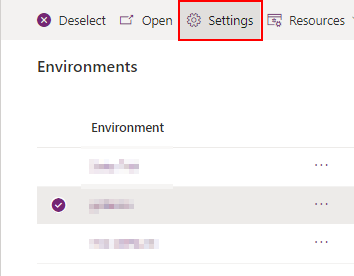
  • Click on Settings on the command bar (located on the top of the screen).
  • Expand the Product section and select Features.


  • Scroll down to Collaboration section on the left side of the screen.
  • Turn on 'Show other people when they're using the same form'.
  • Now when 2 or more users access the same form, you'll see the co-presence indicator showing all the users. It is very similar to what we see on Microsoft 365 Apps (Word, Excel, etc.).
  • This is only enabled for Account, Contact, Opportunity and Case forms during preview.


Here I would also highlight 2 other features that you can enable.
  • You can also see you can initiate a Teams meeting directly from appointments. For that flip the switch 'End users can add and join Teams meetings from appointments in model-driven app' under the Collaboration section.
  • There is also co-authoring for model-driven apps where you can see the users making changes to forms, views or dashboards using the power apps maker portal. With coauthoring you can see who is working on the same app at the same time, and you can see their applied changes in real-time.
Interesting!

Monday, May 23, 2022

D365 CE: How long does a CRM implementation take or what are the various project stages

dynamics 365 crm project implementation

This is a very common question you're asked by your prospective customers, the answer to which is usually never straight forward. This is true if you're implementing Dynamics 365 CE/CRM or any other enterprise application.

Also remember that your client also isn't expecting a short answer like, 6 months, or 11 months. If they are, then that's a clue to leave that premise immediately (just joking). In this case the client needs to be educated on what to expect during the course of the project and prior to go-live.

According to my experience here is what you can say to your customer:
  • CRM implementation happens in various stages.
  • Before we go any further we first need to discuss the scope of the project and it's objectives. This is a very high level scope, something that management envisions and aspires to achieve by implementing a CRM solution.
  • This is further detailed into business requirements. These requirements are specific to departments or various teams that will be using CRM. Each may have broad understanding of the requirements or some may even be very specific. It is also important to understand at this level, what is currently being followed in terms of your internal processes and what part of the process is required to be implemented on CRM.
  • Once the above is clear, there are various project stages:
    • Requirements Phase
      • The requirements (we just spoke about in the previous point) is to be documented into a Business Requirement Document (BRD).
      • This is converted to a Functional Requirement Document (FRD).
    • Solutioning and Design Phase
      • Gap/Fit document: One of the documents to produce during this phase is the gap/fit document. This will outline any gaps in the solution being implemented and it is also good to identify the efforts that will go into delivering it.
      • This is then further detailed into the Functional Design Document (FDD).
      • and Technical Design Document (TDD).
    • Development and Environment Preparation
      • The above documents are handed over to the technical team to start working on the solution.
      • In parallel the infra team can also work on setting up various environments required like Development, SAT and Production Environments. Install / provision the Application.
      • Configure the application and workflows and if it is bespoke then there is a level of customization too.
    • Internal Testing
      • Data cleansing and data formatting.
      • Importing the data.
      • Testing the system.
    • CRP stage or Conference Room Pilot / Class Room Pilot
      • This is when the client will be demo'ed the application with the customized requirements. In most cases this must be a 70-80 % fit based on customer requirements. Expect some changes, few more insights and specific requirements during this stage of the project.
      • Once those gaps are also filled, the product is demo'ed again with the fixes and we move into user acceptance.
    • User Acceptance Test
      • This is when the key users will test the product.
      • If all went well, the we move into training.
      • In parallel a user guide documentation will also be worked upon before the training.
    • Training and Go Live
      • Administrator training
      • User Training
      • The training is usually provided by the key users to all the other users. We insist customer's key users to takes this up which will give them a better grip over the product. 
      • And finally go-live
Having mentioned the above, these are steps on a high-level, and all may or may not be required based on the size of the project and resource availability. By resource availability I mean human resource at both end, the client as we as the implementation partner.

From my personal experience it is very important to understand the requirements and documenting them. This is the most time consuming stage of the project. The other time consuming stage is the data cleansing and preparation. If the customer is using an existing system, it becomes much easier. If you're tasked to upgrade a customer from Excel into a system, this can become a nightmare. I can write another blog to explain how to plan data migration for a project.

Training and user acceptance can also take up time as users must get used to a new way of working and that can take some time. It is important as an implementation partner to hand hold them and repeat processes again and again until each user on the team gets it. This is also the most important step of the project because if they don't understand how to use the system, the adoption will be low and the whole project might fail.

Let me know what your experiences have been in the comments below.

Hope this helps!

                    Tuesday, May 17, 2022

                    Auto number sequence number skipped in Dynamics 365 CE / CRM


                    While testing auto-number functionality in one of our project, we noticed that the auto-number sequence skips, in case of an exception or error while creating the record.

                    For example: If the previous record sequence number was 1001, the next record sequence number must be 1002. However, if there was an exception while creating the record, the record isn't created in this case. Now if the user creates another record (without exception), the record sequence number would show 1003 (instead of 1002), as that number would have been skipped.

                    After going through Microsoft's documentation we understood why this happens, as it is clearly mentioned that the number is incremented before the record creation is started and not after the record has been created.


                    You can access Microsoft's documentation by clicking here.

                    Hope that helps!

                    Monday, May 9, 2022

                    How to enable modern advanced find in model-driven apps: Dynamics 365 CE (CRM)

                    I recently came across this new feature to enable modern advanced find in model-driven apps. Thought to share with you all.

                    Note: When you enable the feature, the advanced find button that you usually see on the bar top right will be gone. There will be changes in the way you access and modify personal views. If you're ready to enable this for your organization, keep reading forward.

                    Old Experience:

                    New Experience (No advanced find icon):


                    Steps to enable modern advanced find in Dynamics 365 CE (CRM)

                    Following are the steps:

                    • Expand Product and click on Features.
                    • Scroll down to Advanced find options and toggle the button to On. It will take a few minutes and enable the modern advanced find in your environment.

                    Now the question is how to access modern advanced find?


                    Access modern advanced find in Dynamics 365 CE (CRM)

                    To access, you need to click on the global search box and below you will find this option "Search for rows in a table using advanced filters".


                    Click this and you will see a flyout option from the right where you can select the entity (table). Click Continue and you'll have the option to edit filters.


                    Now you ask, how to manage personal views? Click on the View chevron icon. This will dropdown a list of views (both system and personal) configured. Personal views are shown with a person icon. To create, set default or delete personal views, click on Manage and share views.


                    Hope that helps!

                    Monday, December 27, 2021

                    Set a view as a default view in D365 CE [System User]

                    With the recent and frequent updates on D365 CE, there are many subtle changes that go un-noticed. The one that I noticed was to be able to setup a view as a default view by a business or system user rather than system admin.

                    Here are the steps:

                    • Suppose this is my default Accounts view (Active Accounts) and I want to change it to "My Active Accounts" view.


                    • Select "My Active Accounts" View.

                    • Scroll down to the bottom of the list of views and select "Set current view as my default"

                    • Now there would be a mention of "Default" near "My Active Accounts" view.

                    Hope that helps!


                    Wednesday, September 8, 2021

                    D365 CE: How to send email without using Send Email step in workflows

                    Use Create Email step instead.

                    Here are the steps with screenshots below.

                    1. Add Step > Create Record > Select Email record.
                    2. Edit your email content / body.
                    3. Add another step, Change Record Status > Pending Send.
                    4. Add another step, Update Email > Set No. of Delivery Attempts to 0.


                    Now that you know how to do it, here are a few reasons why you might want to go this way instead of using Send Email.

                    • You might want to attach documents to the email prior to sending.
                    • You might want to update the email content based on some logic.
                    These cannot be done directly on Send Email step. This is another option.

                    Wednesday, August 19, 2020

                    D365 CE: Unable to load plugin assembly when saving a record

                    Issue Statement

                    After setting up a new on-premise D365 CE v9.0 environment, when I tried creating the first record (Contact record), I received the below error message. I wasn't able to save the Contact record. 


                    Assembly Plugin Error


                    Resolution 1

                    On the app server the C:\Program Files\Dynamics 365\Server\bin\assembly folder is not inheriting security permissions from C:\Program Files\Dynamics 365\Server\bin.  Enable inheritance and you'll be able to save the record successfully.  Inheritance added the following users to ntfs security: all application packages, all restricted application packages, creator owner, system, trusted installer.  Those were not there when inheritance was disabled.

                    Also ensure that the deployment administrator has full permissions on the bin folder C:\Program Files\Dynamics 365\Server\bin.


                    Resolution 2

                    Ensure the deployment administrator has full permissions on the bin folder C:\Program Files\Dynamics 365\Server\bin.


                    Resolution 3

                    Ensure CRMAppPool account has full access on bin folder C:\Program Files\Dynamics 365\Server\bin. Reset IIS.


                    Thursday, February 23, 2017

                    Field Services for Dynamics 365 On-premise

                    Lately I've been searching for an on-premise solution of Field Services for Dynamics 365 / CRM and this is what I found.

                    Download Field Services for Dynamics 365 On Premise

                    Customers can download the solution binaries here for Field Services for Dynamics 365 on-premise.

                    Install Field Services for Dynamics 365 On Premise

                    Follow these instructions here to install field services.

                    Thursday, February 16, 2017

                    How to fix security role issue in Dynamics CRM 365 Online: Access Denied

                    End users sometimes receive error message regarding permissions like the one shown in the below screenshot. Access is denied error.


                    The quickest way to identify the error is to ask the user to Download Log File and forward you the file. You can easily identify the error log file and rectify the issue.

                    This is the log file that you see:

                    Unhandled Exception: System.ServiceModel.FaultException`1[[Microsoft.Xrm.Sdk.OrganizationServiceFault, Microsoft.Xrm.Sdk, Version=8.0.0.0, Culture=neutral, PublicKeyToken=31bf3856ad364e35]]: SecLib::AccessCheckEx failed. Returned hr = -2147187962, ObjectID: 62ccfada-fefa-e511-810b-1458d0431690, OwnerId: 00000000-0000-0000-0000-000000000000,  OwnerIdType: 8 and CallingUser: 1e09c053-3cb8-e511-8105-1458d0431690. ObjectTypeCode: 8, objectBusinessUnitId: 6661ae5f-f0e2-e411-80fb-c4346bac6e74, AccessRights: AppendToAccess Detail:

                    xmlns:i="http://www.w3.org/2001/XMLSchema-instance"
                    xmlns="http://schemas.microsoft.com/xrm/2011/Contracts">
                    1e2012e6-9057-4a0f-bae1-a5b940828e24
                    -2147187962
                    xmlns:d2p1="http://schemas.datacontract.org/2004/07/System.Collections.Generic" />
                    SecLib::AccessCheckEx failed. Returned hr = -2147187962, ObjectID: 62ccfada-fefa-e511-810b-1458d0431690, OwnerId: 00000000-0000-0000-0000-000000000000,  OwnerIdType: 8 and CallingUser: 1e09c053-3cb8-e511-8105-1458d0431690. ObjectTypeCode: 8, objectBusinessUnitId: 6661ae5f-f0e2-e411-80fb-c4346bac6e74, AccessRights: AppendToAccess
                    2017-02-16T11:14:35.7151013Z


                    ObjectTypeCode and AccessRights are the 2 items you need to focus on. ObjectTypeCode is the numerical representation of an entity or item. Microsoft provides you a list of ObjectType Code mapping for CRM.

                    In this case the code is 8 which states its a SystemUser. Which means the User entity doesn't has Access Rights of AppendTo. Enabling that would solve the issue.

                    But how about for custom entities, you ask?

                    Here is what you should be doing. For custom entities, open your browser and browse to this URL.
                    https://mycrmorg.crm4.dynamics.com/main.aspx?etc=11068&pagetype=entityrecord

                    Where etc=11068 is taken from the error log file which is the ObjectTypeCode. When you browse to this URL, the entity record page opens, which points you to the direction that this custom entity needs the AccessRight as mentioned in the error log.

                    I hope this helps!

                    Thursday, October 13, 2016

                    How to enable interactive experience in Dynamics CRM

                    Microsoft Dynamics CRM 2016 and CRM Online has an interactive experience to offer. You can notice this on the notification bar at top of CRM.

                    To enable the interactive experience in Dynamics CRM, you can either click on Experience it now from the notification bar as shown here:


                    Or you can input the URL directly in your browser. The URL would be different for CRM Online or CRM (on premise).

                    Microsoft Dynamics CRM (on-premises) : In your browser, type //engagementhub.aspx, and then press Enter. For an Internet-facing deployment (IFD) use https://< hostname[:port]>/engagementhub.apsx.

                    If more than one organization is available, and you don’t specify one, the default organization will be used.

                    Microsoft Dynamics CRM Online : Type https://. crm#.dynamics.com/engagementhub.aspx, and press Enter.

                    You can always go back to the original main experience by replacing https://..../engagementhub.aspx to https://..../main.aspx

                    Thursday, October 6, 2016

                    Understanding email marketing quotas in Microsoft Dynamics Marketing

                    This is my first post on Dynamics Marketing and I would like to address the quotas and limits for email marketing.

                    While this is critical for customers to know, let me also introduce you to the buying process and how to set up Microsoft Dynamics Marketing.

                    Getting on to the quotas:

                    For trial instance : Monthly quota is 30k emails / month and daily quota is 50 emails. (I don't know how this makes sense though because if you do the math, you can never reach the monthly quota)

                    For paid instance : Monthly quota in 50k emails / month and daily quota is half of your monthly quota. Which means you can send 25k emails on a day.

                    Additional email quota : can be bought in multiples of 10k emails / month.

                    Microsoft Dynamics Marketing Additional Quota

                    Saturday, October 1, 2016

                    Monthly bulletin on Dynamics CRM - September 2016

                    We've wrapped up September and here are a few things I thought were worth sharing:

                    ADXstudio vs SharePoint for Dynamics CRM: Why would you prefer ADXstudio over SharePoint and vice versa - https://mscrmnovice.blogspot.ae/2016/09/adxstudio-vs-sharepoint-for-dynamics-crm.html

                    HP prefers Microsoft Dynamics CRM over Salesforce: Microsoft has secured a deal with HP to host Microsoft Dynamics CRM Online and Microsoft Cloud services for thousands of HP employees across sales, marketing and services operations - https://techcrunch.com/2016/09/12/microsoft-snatches-hp-crm-and-services-business-from-rivals-salesforce-and-oracle/

                    Tracking and synchronizing Contacts and Activities between CRM and Exchange
                    https://blogs.msdn.microsoft.com/crm/2016/09/06/tracking-and-synchronization-of-communication-activities-and-contacts-using-outlook-and-exchange-integrations-in-crm/

                    How server side sync works?
                    https://blogs.msdn.microsoft.com/crm/2016/09/06/interested-in-learning-how-server-side-sync-works/

                    This post came across sometime ago and I thought was worth sharing. Would really help someone from a Business Consulting role.

                    Dynamics AX vs. Dynamics CRM
                    https://www.ebecs.com/microsoft/dynamics-ax/microsoft-dynamics-ax-vs-microsoft-dynamics-crm

                    Monday, September 19, 2016

                    ADXstudio vs SharePoint for Dynamics CRM

                    Microsoft buys ADXstudio. I believe this is a known fact to all.

                    How does it compare to SharePoint. Why use ADXstudio over SharePoint and why not? I'll try and answer these questions here.

                    Grant McLarnon wrote a great post on why use ADX portals over SharePoint providing you six reasons. It's a great place to give you a head start. What I'm going to focus on is not the technical bit but from a business stand point.

                    ADXstudio is a great portal solution which provides OOB customer portal, partner portal, community portal, content management and profile management features. All these features are licensed under a single license. You only need to license per CRM organization and not user based. On the other hand, SharePoint is user based licensing and all these features mentioned above have to be manually developed which is time consuming and increases cost.

                    ADXstudio however, doesn't offer rich document management features like version control, metadata definition of documents, document collaboration and sharing between team members, views and filtering options. With a powerful search engine on SharePoint, looking for documents is much easier even if you don't remember the location of the document within SharePoint. Now it's even better with Office web apps, one can open and edit documents online without having a desktop client for word, powerpoint or excel.

                    While ADXstudio provides you with certain portal features to meet specific business requirements, SharePoint on the other hand is a clean slate where your imagination is the limit.

                    In this blog I'm not trying to promote ADX portals or SharePoint, but only helping you make informed decisions. You would really need to vet the options before implementing one over the other.


                    Thursday, September 1, 2016

                    Monthly bulletin on Dynamics CRM - August 2016

                    Here are a few things I thought are worth sharing this month:

                    Now you can backup and restore your CRM Online instances (for both production and sandbox). Microsoft has provided us the ability to perform backups on demand:  Backup and restore your CRM Online instance

                    FantasySalesTeam update 1.4.6 is now available. Microsoft has improved the process for Metric Feed. FantasySalesTeam update

                    Collect feedback and rate records in CRM Online and Dynamics CRM 2016. Collect feedback using the Feedback entity

                    New data type for CRM fields called Customer added in CRM Online. Now you can include the Customer data type in system and custom entities.

                    customer data type in Dynamics CRM Online


                    Monday, August 8, 2016

                    Mid week post: Power BI + Dynamics CRM

                    Here are 2 things I would like to highlight to you this week:
                    I don't want you to miss this awesome visual added to the Power BI visual gallery called Pulse Chart. Read more about it on Microsoft Power BI blog.

                    Monday, October 27, 2014

                    How to fix: The resource you are looking for has been removed in CRM 2013

                    During the installation of Microsoft Dynamics CRM 2013 Server, I received the following error message:

                    Module IIS Web Core
                    Notification MapRequestHandler
                    HandlerStaticFile
                    Error Code 0x80070002

                    Requested URL
                    http://localhost:5555/****/{635427333390000809}/WebResources/msdyn_/PersonalWall.htm

                    Physical Path
                    C:\Program Files\Microsoft Dynamics CRM\CRMWeb\****\{635427333390000809}\WebResources\msdyn_\PersonalWall.htm

                    Logon Method Negotiate

                    Cause
                    Apparently, this is because the IIS URL Rewrite module is not rewriting the URL correctly. CRM creates rules within the rewrite module; for FederationMetadata and WebResourcesRule.

                    One of these rules is to load the handlers/FederationMetadata.ashx when Federation Metadata/2007-06/FederationMetadata.xml is requested.

                    We have to check if the URL Re-write module is available in IIS on the CRM website and if the re-write rules are present. If the re-writing rule is present then URL Re-write is corrupt and we need to re-install it.

                    Resolution

                    • Navigate to Add/Remove programs
                    • Identify Microsoft URL Rewrite Module and uninstall it
                    • To re-install the module locate rewrite_1.1_amd64_rtw file in the CRM 2013 Server installation folder “UrlRewriteModule”
                    This is also true for CRM 2011 just in case you have similar installation issues with CRM 2011.

                    Tuesday, September 14, 2010

                    Update Rollup vs. Build Version comparison for Microsoft Dynamics CRM

                    To determine which update rollup is installed on your server or client, the below table provides a precise mapping between the update rollup version and CRM build version.

                    (This post is regularly updated to keep current with the latest releases)

                    The updates documented in this blog for:
                    • Microsoft Dynamics CRM 4.0
                    • Microsoft Dynamics CRM 2011
                    • Microsoft Dynamics CRM 2013
                    • Microsoft Dynamics CRM 2015
                    • Microsoft Dynamics CRM 2016
                    You can use the below command using SQL Server Management Studio on your CRM database to determine the current version of CRM.

                    select * from BuildVersion


                    If you're unable to view the above table, click here to see it in a new page.

                    As mentioned earlier, I'll try to keep this post updated. In case of any delays, thank you for leaving a comment below. This will keep other visitors updated while notifying me too to take an action.