Tuesday, March 28, 2023

How to register for ClickDimensions (D365 CE)

ClickDimenions is a marketing automation tool for Dynamics 365 Customer Engagement (CRM). Tool wouldn't be the right terminology as it is a very comprehensive application to address all your marketing needs.

While the online help and guides provided by ClickDimensions are very detailed, I thought to summarize this in below few steps to register and install the app in your environment.

Step 1

Select the data center region and deployment type. The data center region must be the same or closest to your D365 CE data center region.


Step 2

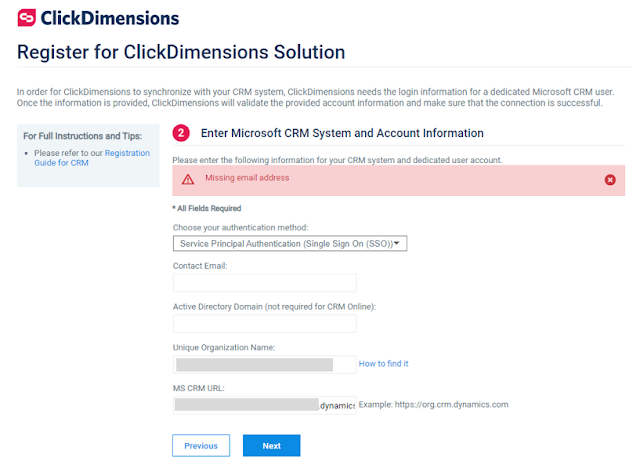
Select the authentication method. You can check out the various authentication methods in this article from ClickDimensions (Register for ClickDimensions).

The contact email that you enter here is the email where the installation files / solution will be sent to.


Step 3

You will be asked to login and authenticate the app to access in the environment.

Step 4

Once the app access is provided, a notification is sent to ClickDimensions and they will generate the solution file and share it with the person mentioned in the Contact Email of the registration.

Step 5

Download the solution and import into D365 using the Power Apps Maker at https://make.powerapps.com.

Tuesday, March 21, 2023

Microsoft Dynamics 365 Customer Engagement releases versions

Here is the list of all the release versions up until version 9.1 https://support.microsoft.com/en-us/kb/2925359

For the latest Microsoft Dynamics 365 release notes, visit Released Versions of Dynamics 365 for Customer Engagement here: https://learn.microsoft.com/en-us/dynamics365/released-versions/Microsoft-Dataverse#all-version-availability

Monday, March 13, 2023

D365 CE Preview Feature (Collaboration and Co-authoring)

One of the most common ask from our customers is, does the app block one user from accessing or making changes to a record if another user has opened the record on their screen?

While this is not quite like restraining a user from updating a record because of multiple users accessing it, this feature does allow you to see the other folks that are collaborating on the same record.

You’ll need to enable this in your environment to take advantage of this feature.

  • Open https://admin.powerplatform.microsoft.com
  • Select the environment where you want to enable the functionality.
  • Click on Settings on the command bar (located on the top of the screen).
  • Expand the Product section and select Features.


  • Scroll down to Collaboration section on the left side of the screen.
  • Turn on 'Show other people when they're using the same form'.
  • Now when 2 or more users access the same form, you'll see the co-presence indicator showing all the users. It is very similar to what we see on Microsoft 365 Apps (Word, Excel, etc.).
  • This is only enabled for Account, Contact, Opportunity and Case forms during preview.


Here I would also highlight 2 other features that you can enable.
  • You can also see you can initiate a Teams meeting directly from appointments. For that flip the switch 'End users can add and join Teams meetings from appointments in model-driven app' under the Collaboration section.
  • There is also co-authoring for model-driven apps where you can see the users making changes to forms, views or dashboards using the power apps maker portal. With coauthoring you can see who is working on the same app at the same time, and you can see their applied changes in real-time.
Interesting!

Friday, March 3, 2023

2 Lesser known facts about Dynamics 365 CE (CRM Sales)

 While exploring the default forms and views for Dynamics 365 Sales I understood few facts. It is strange how even after years of experience on the product there are still some things that you have never explored.

I guess the main reason is that these don't impact any implementation in a major way, hence you tend to ignore them, and only find out by accident, like I did. So here are the facts.


1. Discount List forms and views cannot be customized


That's right. When you try to add form and view components for the Discount List table, you'll see that there are no components to be found here. 😲


2. Cannot add some fields on Price List Item views 


When I was expanding the default price list item view to show certain columns like Created By, Created On, Price List (Lookup), Modified By, Modified On. These fields are not available to add on the view, or even on the form.

Did you know?

Comment down below if there is something you discovered that was strange to you.

Monday, May 23, 2022

D365 CE: How long does a CRM implementation take or what are the various project stages

dynamics 365 crm project implementation

This is a very common question you're asked by your prospective customers, the answer to which is usually never straight forward. This is true if you're implementing Dynamics 365 CE/CRM or any other enterprise application.

Also remember that your client also isn't expecting a short answer like, 6 months, or 11 months. If they are, then that's a clue to leave that premise immediately (just joking). In this case the client needs to be educated on what to expect during the course of the project and prior to go-live.

According to my experience here is what you can say to your customer:
  • CRM implementation happens in various stages.
  • Before we go any further we first need to discuss the scope of the project and it's objectives. This is a very high level scope, something that management envisions and aspires to achieve by implementing a CRM solution.
  • This is further detailed into business requirements. These requirements are specific to departments or various teams that will be using CRM. Each may have broad understanding of the requirements or some may even be very specific. It is also important to understand at this level, what is currently being followed in terms of your internal processes and what part of the process is required to be implemented on CRM.
  • Once the above is clear, there are various project stages:
    • Requirements Phase
      • The requirements (we just spoke about in the previous point) is to be documented into a Business Requirement Document (BRD).
      • This is converted to a Functional Requirement Document (FRD).
    • Solutioning and Design Phase
      • Gap/Fit document: One of the documents to produce during this phase is the gap/fit document. This will outline any gaps in the solution being implemented and it is also good to identify the efforts that will go into delivering it.
      • This is then further detailed into the Functional Design Document (FDD).
      • and Technical Design Document (TDD).
    • Development and Environment Preparation
      • The above documents are handed over to the technical team to start working on the solution.
      • In parallel the infra team can also work on setting up various environments required like Development, SAT and Production Environments. Install / provision the Application.
      • Configure the application and workflows and if it is bespoke then there is a level of customization too.
    • Internal Testing
      • Data cleansing and data formatting.
      • Importing the data.
      • Testing the system.
    • CRP stage or Conference Room Pilot / Class Room Pilot
      • This is when the client will be demo'ed the application with the customized requirements. In most cases this must be a 70-80 % fit based on customer requirements. Expect some changes, few more insights and specific requirements during this stage of the project.
      • Once those gaps are also filled, the product is demo'ed again with the fixes and we move into user acceptance.
    • User Acceptance Test
      • This is when the key users will test the product.
      • If all went well, the we move into training.
      • In parallel a user guide documentation will also be worked upon before the training.
    • Training and Go Live
      • Administrator training
      • User Training
      • The training is usually provided by the key users to all the other users. We insist customer's key users to takes this up which will give them a better grip over the product. 
      • And finally go-live
Having mentioned the above, these are steps on a high-level, and all may or may not be required based on the size of the project and resource availability. By resource availability I mean human resource at both end, the client as we as the implementation partner.

From my personal experience it is very important to understand the requirements and documenting them. This is the most time consuming stage of the project. The other time consuming stage is the data cleansing and preparation. If the customer is using an existing system, it becomes much easier. If you're tasked to upgrade a customer from Excel into a system, this can become a nightmare. I can write another blog to explain how to plan data migration for a project.

Training and user acceptance can also take up time as users must get used to a new way of working and that can take some time. It is important as an implementation partner to hand hold them and repeat processes again and again until each user on the team gets it. This is also the most important step of the project because if they don't understand how to use the system, the adoption will be low and the whole project might fail.

Let me know what your experiences have been in the comments below.

Hope this helps!