
you want to sync data for the newly added legal entity.
Also, without impacting existing legal entities.
The Core Concept
The checkbox "Skip initial write for newly added legal entities" controls whether an initial sync (initial write) is triggered from Dynamics 365 FO to Dataverse when a new legal entity is added.
2) Checkbox is unchecked (recommended for initial sync)
A common real-life scenario:


This confirms the initial write has been triggered only for the new legal entity.
Hope this helps!
Two possible behaviors:
1) Checkbox is checked
- Initial sync is skipped
- No data is written automatically for that legal entity
- You must manually trigger syncs later
2) Checkbox is unchecked (recommended for initial sync)
- Initial sync runs automatically
- Sync applies only to the newly added legal entity
- Existing legal entities are not reprocessed
- Better performance and cleaner execution
👉 Bottom line:
Unchecking this box is the correct and safest way to run an initial sync only for the new legal entity.
When To Use This
A common real-life scenario:
- Dual-write is already running and live with other legal entities.
- A new company / legal entity is introduced later.
- You want data to sync only for the new entity, without disturbing production data.
Step-by-Step: Perform Initial Sync for a New Legal Entity
Step 1: Open Dual-write
Navigate to: Workspaces → Data management → Dual-write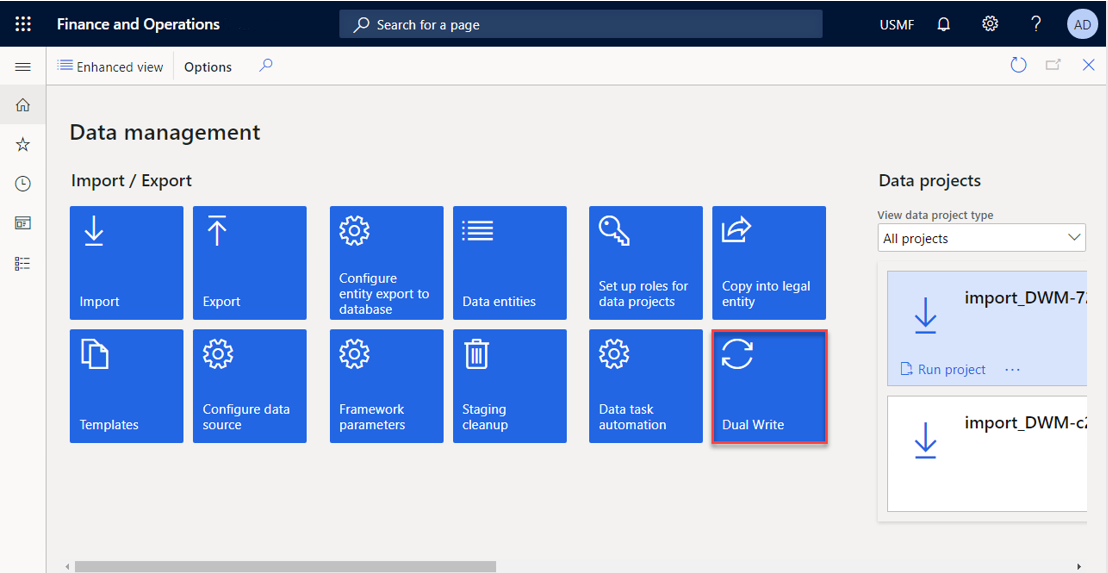
Step 2: Open Environment Details
Click Environment details from the Dual-write workspace.Step 3: Go to Legal Entities
Select Legal Entities to view the list of companies enabled for Dual-write.
Step 4: Add the New Legal Entity
- Click Add Legal Entity.
- ❌ Uncheck: Skip initial writes for newly added legal entities
- Click Save
Step 5: Confirm Sync Completion
- Once the system finishes syncing table maps, you’ll see: Legal entities updated successfully!
This confirms the initial write has been triggered only for the new legal entity.
What Happens Behind the Scenes
- Dual-write runs initial write only for the new legal entity.
- Existing legal entities are untouched.
- No historical reprocessing.
- No performance degradation.
- Table maps are reused automatically.
- Makes incremental rollout safe.

No comments:
Post a Comment